
How to Optimize Your Seat Count Management
Is Your CRM Bill Haunting You?
Did you know your agency might be paying for CRM and Dialer seats that are just sitting there, collecting dust? It’s a common leak in agency overhead, but the good news is that it’s entirely within your control.
Here is everything you need to know about managing your TLD seats like a pro.
The Golden Rule: Seats Are Manual
In our system, every user gets their own dedicated CRM and Dialer seat. However, these seats don’t just appear or disappear on their own; they must be managed manually as your team grows or shrinks.
Scaling Up: Adding New Talent
When you’re ready to bring a new heavy hitter onto the team, follow this quick workflow:
- Check the HUD: Look at the top of your screen to identify the number of seats you currently need.
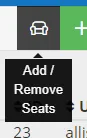
- Find the Chair: Head to the black chair icon at the top of your dashboard. Hovering over it will reveal the “Add/Remove Seats” option.
- Match the Count: Click the icon and manually increase the “In Use” count to reflect your new total.
- Save the Step: If your “Available” seat count is already high enough for your new hire, you can skip the adjustment entirely.
The “Offboarding Trap”: Don’t Pay for Empty Desks
This is where most agencies lose money. When an agent leaves, deactivating their profile is only half the job.
- Deactivate the User: Go to Users – Manage All and deactivate the departing team member’s profile.
- The Essential Second Step: You must return to that same chair icon and manually decrease your seat count.
Why this matters: If you skip Step 2, you will continue to be charged for that seat, even if no one is using it.
Understanding Your Billing
- Prorated Growth: If you add seats mid-month, they are prorated on your next bill.
- No Credits for Removals: While new seats are prorated, removed seats are not prorated as credits for the current month. Make sure to reduce your count prior to the 1st of the month to avoid being billed for extra seats in the next cycle.
- The Swap Rule: If you remove a seat and then add one back within the same month, you won’t be charged twice for that “slot”.
We’ve Got Your Back
Managing growth is hard enough; your software billing shouldn’t make it harder. If you have questions about your seat count or need a hand with billing, the TLD Support team is ready to help. Just shoot us a message on Slack or give us a call.